|
 |
 | POWERPOINT ENHANCEMENT SOFTWARE |
|
|
|
|
 | |
 |
POWERPOINT MEDIA PRODUCTS |
|
|
|
|
|
|
|
|
|
|
|
| SHOPPING CART |
 |
|
 | |
|
POWERPOINT HELP |
|
|
|
|
|
|
|
|
|
|
| |
| |
|
Insert, control and play video backgrounds in PowerPoint and embed YouTube in PowerPoint to create stunning TV-Style slides.Whether you use PowerPoint 2000, 2003 or 2007 to create your presentations. Or whether you use a newer release of Microsoft PowerPoint, such as PowerPoint 2010, PowerPoint 2013 or Office 365.
However you create your slides, your audience still sees and experiences the same PowerPoint presentation today as they did over 15 years ago.
Introducing the all new 123PPT Video Backgrounds StudioTM for PowerPoint. |
|
* Please note: Video has been compressed for online streaming purposes.
Press the Full Screen icon in the player toolbar to view this presentation full screen. |
|
 | Insert full screen Video Backgrounds in PowerPoint |
| Insert YouTube in PowerPoint |
| Play video backgrounds and YouTube movies behind your PowerPoint slide content |
| Create stunning TV-style presentations in broadcast quality up to full High-Definition (HD) |
| Control video background aspect ratio, color, transparency and speed |
| Combines with the 123PPT Music & SoundFX Studio™ to create full multimedia PowerPoint presentations |
| PowerPoint 2000, 2002, 2003, 2007, 2010, 2013 and Office 365 (32-bit) compatible |
| Fully Windows 2000, XP, Vista, Windows 7 and Windows 10 compatible |
|
|
Simple to use wizards with the power to create stunning presentations
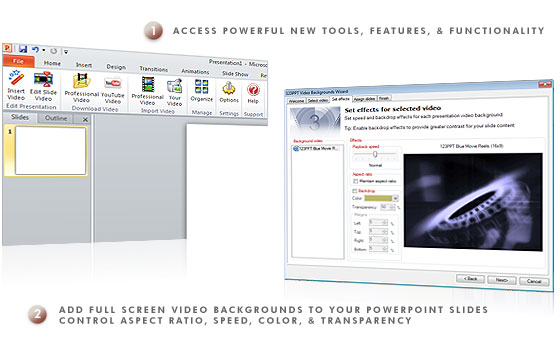
The all new 123PPT Video Backgrounds Studio provides new tools, features, and functionality for Microsoft Office PowerPoint that allow you to easily create and play truly stunning full screen full motion professional presentations with seamless looping video backgrounds in PowerPoint.
With added features that give you control over aspect ratio, transparency and even allow you to change the speed and color of your video backgrounds in real-time as well as insert YouTube movies. The 123PPT Video Backgrounds Studio is the definitive PowerPoint enhancement software for presenters who need to make an impact.
|
 |
|
|

|
* Please note: Video has been compressed for online streaming purposes.
Press the Full Screen icon in the player toolbar to view this presentation full screen. |
|
Inspire and engage your audience like never before
With the 123PPT Video Backgrounds Studio for PowerPoint you can finally create PowerPoint presentations that engage and excite your audiences. Click here to see how the 123PPT Video Backgrounds Studio can transform and create truly stunning presentations.
With the 123PPT Video Backgrounds Studio you really can inspire your audience, embed YouTube movies and video into PowerPoint and add video backgrounds to your PowerPoint presentations. |
|
|
|
|
Now you have seen the power of the 123PPT Video Backgrounds Studio why imagine what it could do for your next presentation when you can get your copy now?
|
|
|
|
|
|
|