123PPT.com 
PowerPoint templates, PowerPoint backgrounds, 
Photos and Photographs, Sound Effects and Music, 
Fonts and Typography, Presentation Services.
The 123PPT Video Backgrounds Studio™
Create and play full screen full motion video PowerPoint presentations The 123PPT Video Backgrounds Studio™
Create and play full screen full motion video PowerPoint presentations
The 123PPT Music & SoundFX Studio™
PowerPoint has never sounded so good. The 123PPT Music & SoundFX Studio™
Complete control of your presentation music, sound effects and audio.
The 123PPT Presentations Player™
Play and share your video and multimedia PowerPoint presentations with anyone using this free standalone player. The 123PPT Presentations Player™
Play and share your video and multimedia PowerPoint presentations with anyone using this free standalone player.
PowerPoint templates
Insert and play video animated backgrounds in PowerPoint Insert and play video backgrounds in PowerPoint behind your slide text and content
PowerPoint backgrounds PowerPoint backgrounds
Photos images and illustrations for PowerPoint Photos images and illustrations for PowerPoint
Sound effects and background music loops for PowerPoint Music loops and sound effects for PowerPoint
Fonts Fonts
Presentation Services Custom PowerPoint template design and Presentation Services
Your Shopping Cart is currently empty
The 123PPT Presenters Forum
Discuss PowerPoint, presentations, speeches,
and techniques in the forum.
Sign up for our Newsletter to get the latest Presentation Articles, PowerPoint Tutorials, Tips, and Special Product Offers.
Presentation Articles, Advice, and Helpful Commentaries from experts and industry professionals
PowerPoint Tutorials, Tips, Tricks, and Help
Frequently Asked Questions about 123PPT.com and 123PPT.com's Products and Services
Links to Presentation Resources
Fonts A Site Map and overview of 123PPT.com
Contact 123PPT.com
 
Every month a selection of products are offered to you at specially discounted prices

December 15, 2004   Edition Nr: 004
Exclusive offer in this edition on the Bastian Sans Cd Font.

In this edition of the 123PPT.com Newsletter, we have selected the Bastian Sans Cd Font, Statue of Liberty USA PowerPoint template, and the Cheque Book & Pen Photo, as our special product picks, offered to you at exclusive discounted prices.

Which means that from 15/12/04 until 31/12/04, the Bastian Sans Cd Font can be yours for only $19.95! Saving you $20!

In addition you can increase your savings and save over $275 by purchasing the whole Bastian Sans Cd Font Family, comprised of 12 individual fonts. To view the Bastian Sans Family, and learn more please click here.

And remember only as a subscriber to the 123PPT.com Newsletter can you purchase the Bastian Sans Cd Font, as well as our other selected products at these exclusive and fantastic savings.

To take advantage of the Bastian Sans Cd Font, or all of this edition's exclusive product offers and discounts, simply tick the checkboxes of the products that you would like to purchase, and click the Add button, to add them to your Shopping Cart.

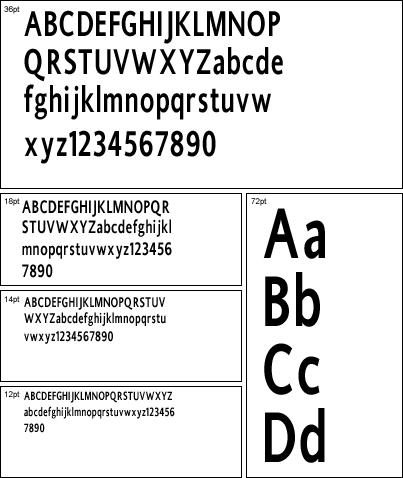
Bastian Sans Cd

Font Name: Bastian Sans Cd

Font Design: The Bastian Sans Cd Font, was designed and created by our creative artists at 123PPT.com. And is a member of The Bastian Sans Family.
Select operating system and type to add to cart:
Macintosh Bastian Sans Cd Postscript Font
Macintosh Bastian Sans Cd TrueType Font
PC Bastian Sans Cd PostScript Font
PC Bastian Sans Cd TrueType Font
Remember: You can always remove items from your shopping cart later.

Buy the the whole Bastian Sans Font Family and
Save over $275!
Click here to view the whole Bastian Sans Font Family and find out more
Font Design Detail
Email this page to a Friend     About 123PPT.com     Advertise on 123PPT.com

All content within this page remains the property of 123PPT.com.
Terms of Use prohibit the reproduction, copying or other forms of republishing without written consent.

© 2004 123PPT.com. All rights reserved.

Take advantage of this editions exclusive product discounts
Read this editions exclusive Article from Dave Clark
Follow this editions exclusive PowerPoint Tutorial
Ask the Experts a presentation question
Return to the Newsletter